Getting Traffic and Usage Statistics in 3DVista
You can get this without Google Analytics, and its EASY to setup and use!
Are you looking to track visits to your virtual tour? Not only visits but also where that traffic is coming from and other useful statistics? While you can embed a Google Analytics code into 3DVista, many times that is the client’s GA code, and you may not have access to the data. The approach below is a great way to pull traffic data from any tour you deploy in 3DVista, and you do not need Google Analytics.
This solves many scenarios that may be causing you difficulty. For example:
- Your client requires you to use their Google Analytics code in the tour so they can track the traffic and stats. You also want to see traffic and usage data but do not have access to the client’s GA account.
- You want something more streamlined and easy to use. You want a stats and traffic report that is easy to read and understand.
- You want to see live data on your tours, such as the number of tour viewers currently using the tour, where they are located, and how much time they spend on the tour.
- You want to provide clients access to traffic and usage statistics that they can access and see anytime merely by logging in and viewing the reports—no need for them to have a Google account.
- You want something to track statistics and traffic on every tour you design and easily separate the stats for each of your clients.
- You want to provide your clients a monthly stats report (that they can even log in and download anytime!) on their tour usage and traffic. This can even be sold as an upsell option.
Check out some of types of statistics and data you can easily view

All of this and more is as easy as creating an account and inserting a snippet of code in the index.html file that 3DVista creates when publishing. (This is not for those using 3DVista’s hosting service – they provide stats as part of your hosting service. This is for those of us who have our own hosting accounts or tours hosted on client’s web servers.)
Create an account with Web-Stat: http://www.web-stat.com/?id=4554
Web-Stat offers a free account option that offers basic stats and an enhanced upgraded option offering much more detailed info and guest(your clients) access to reports. The upgraded option is low cost and offers some powerful features such as being able to provide your clients a log in account to view certain stats. The map view of traffic and real time visitor traffic is a great feature as well.
How to use Web-Stat with 3DVista
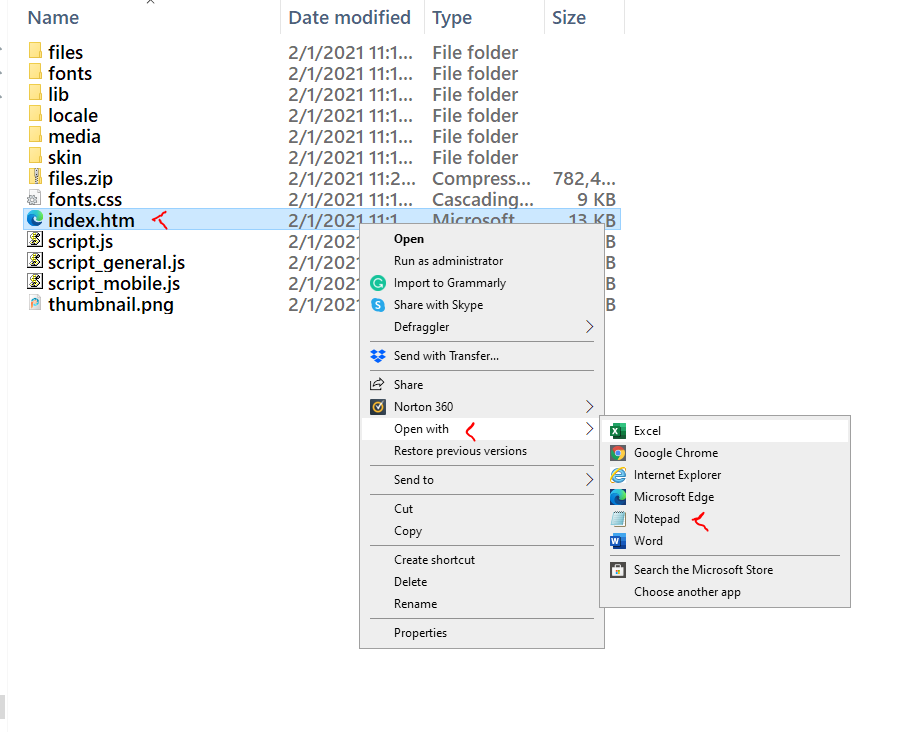
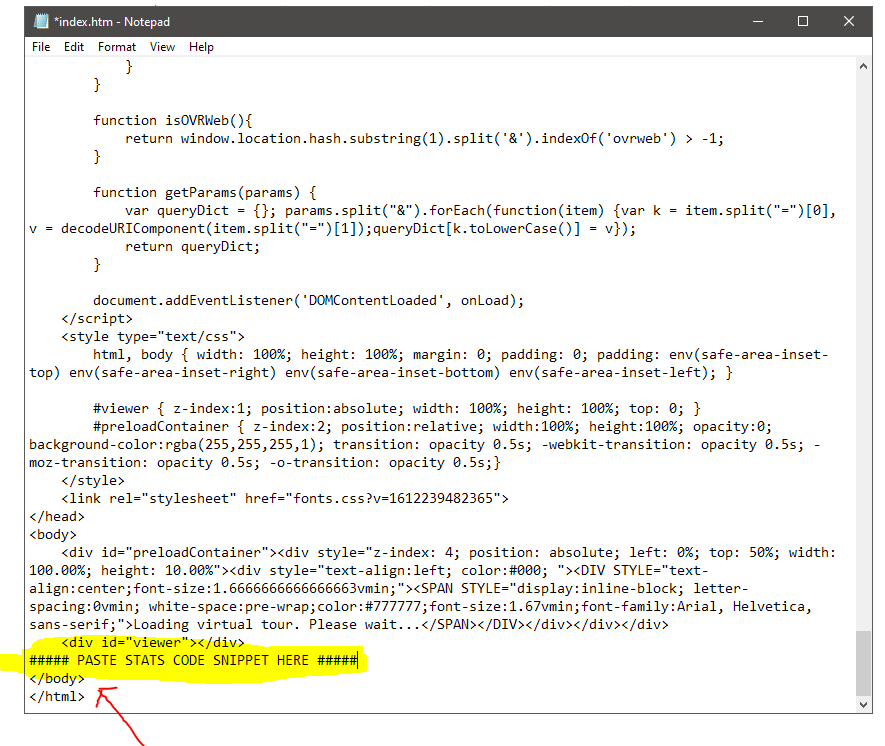
Once you create your account, your unique code snippet is provided. Copy it. Before you upload your published tour files to your web host, open your tour’s index.html file in notepad or any text editor and scroll to the end of the file. Paste the code snippet right above the </body> tag. Save the index.html file with the snippet now pasted into it. You can now upload your tour files as you normally would. Once uploaded, view your tour and check out your new stats and live real-time viewers info!
it's that easy!
Virtual tours are a growing need among businesses as they look for ways to better reach customers and prospects.